关于 EOF 的一切
All About EOF
关于 EOF 的一切
December 4, 2012
2012 年 12 月 4 日
Introduction
引言
Of all of the problems posted by beginner C++ and C programmers on sites like Reddit and Stack Overflow, surely the commonest is the confusion over the treatment of the end-of-file condition when writing programs that either interact with the user or read input from files. My own estimate is that over 95% of questions exhibit a complete misunderstanding of the end-of-file concept. This article is an attempt to explain all of the issues regarding this confused and confusing subject, with particular reference to C++ and C programmers using the Windows and Unix-like (such as Linux, which I’ll use from now on as the exemplar for this OS type) operating systems.
在 Reddit 和 Stack Overflow 等站点上,初学者关于 C 和 C++ 的问题中,最常见的无疑是对“文件结束”(end-of-file)处理的困惑:无论是与用户交互的程序还是从文件读取输入的程序,很多人对 EOF 的概念都存在误解。我估计超过 95% 的相关问题都源于对 EOF 的误解。本文旨在解释有关 EOF 的所有问题,尤其面向在 Windows 与类 Unix(如 Linux,下文将以 Linux 作为该类系统的代表)上编程的 C 与 C++ 程序员。
The myth of the EOF character
关于 EOF 字符的误解
The first problem that many beginners face when confronted with the end-of-file issue is that of the EOF character – basically, there isn’t one, but people think there is. Neither the Windows nor the Linux operating systems have any concept of a marker character for indicating the end-of-file. If you create a text file using Notepad on Windows, or Vim on Linux, or any other editor/OS combination you fancy, that file will nowhere in it contain a special character marking the end-of-file. Both Windows and Linux have file systems that always know the exact length in bytes of the contents of a file, and have absolutely no need of any special character marking the file’s end.
很多初学者在遇到文件结束问题时,首先想到的是“EOF 字符”——实际上并不存在这样的通用字符,但很多人误以为有。无论是 Windows 还是 Linux,都没有通过某个标记字符来表示文件结束的机制。用 Windows 的 Notepad、Linux 的 Vim 或其他任意编辑器创建的文本文件中,都不会包含某个特殊字符来标识文件末尾。Windows 与 Linux 的文件系统都能精确知道文件的字节长度,因此根本不需要特殊字符来标记文件结束。
So if neither Windows nor Linux use an EOF character, where does the idea come from? Well, long ago and far away, there was an operating system (to use the term loosely) called CP/M, which ran on 8-bit processors like the Zilog Z80 and Intel 8080. The CP/M file system did not know exactly how long a file was in bytes – it only knew how many disk blocks it took up. This meant that if you edited a small file containing the text hello world, CP/M would not know that the file was 11 bytes long – it would only know it took up a single disk block, which would be a minimum of 128 bytes. As people generally like to know how big their files appear to be, rather than the number of blocks they take up, an end-of-file character was needed. CP/M re-used the Control-Z character (decimal code 26, hex 1A, original intended use lost in the mists of time) from the ASCII character set for this purpose – when a CP/M application read a Control-Z character it would typically treat that read as though an end-of-file had occurred. There was nothing forcing applications to do this; apps that processed binary data would need some other means of knowing if they were at the end-of-file, and the OS itself did not treat Control-Z specially.
既然 Windows 与 Linux 都不使用 EOF 字符,那这个想法从何而来?早期有一个操作系统(姑且称之为操作系统)叫 CP/M,运行在 Zilog Z80 或 Intel 8080 之类的 8 位处理器上。CP/M 的文件系统无法精确知道文件的字节长度,只知道它占用了多少磁盘块。例如包含文本 “hello world” 的小文件,CP/M 不会知道它是 11 字节,只知道它占用了 1 个磁盘块(块大小最少为 128 字节)。为了让用户知道文件“看起来”大小,人们需要一个文件结束标记。CP/M 采用了 ASCII 中的 Control-Z(十进制 26,十六进制 1A)作为该目的的标记——当 CP/M 应用读到 Control-Z 时,通常会把它当作 EOF 处理。这里并没有强制要求应用这样做;处理二进制数据的程序需要其他方式判断是否到了文件末尾,而且操作系统本身并不把 Control-Z 视作特殊字符。
So when MS-DOS came along, compatibility with with CP/M was very important, as a lot of the first MS-DOS applications were simply CP/M apps that had been fed through mechanical translators that turned Z80/8080 machine code into 8086 machine code. As the applications were not re-written, they still treated Control-Z as the end-of-file marker, and some do to this very day. In fact, this treatment of Control-Z is built in to the Microsoft C Runtime Library, if a file is opened in text mode. It’s important to restate that the Widows OS itself knows and cares nothing about Control-Z – this behaviour is purely down to the MS library, which unfortunately just about every Windows program uses. It’s also important to realise that this is purely a Windows issue – Linux (and the other Unixes) have never used Control-Z (or anything else) as an end-of-file marker in any shape or form.
后来 MS-DOS 出现时,与 CP/M 的兼容性很重要,因为许多最早的 MS-DOS 应用只是通过机械方式把 CP/M 的 Z80/8080 机器码转换为 8086 机器码。这些程序没有重写,仍把 Control-Z 当作 EOF 标记,至今仍有程序这样处理。实际上,如果以文本模式打开文件,Microsoft 的 C 运行时库会把 Control-Z 当作特殊处理。需要重申的是,Windows 操作系统本身并不关心 Control-Z——这是 MS 运行时库的行为,而几乎所有 Windows 程序都使用该库。还要注意,这是 Windows 特有的问题:Linux(以及其他类 Unix 系统)从未把 Control-Z(或其他任意字符)当作文件结束标记。
Some demo code
示例代码
You can demonstrate this unfortunate feature of the MS libraries with this code. First, write a program that puts a Control-Z into a text file
#include <iostream>
#include <fstream>
using namespace std;

int main() {
   ofstream ofs( "myfile.txt" );
    ofs << "line 1\n";
    ofs << char(26);
    ofs << "line 2\n";
}
下面的代码可以演示 MS 运行时库的这种不幸行为。首先写一个程序,在文本文件中插入 Control-Z: (代码保持原样,不翻译)
If you compile and run this on either Windows or Linux, it will create a text file with an embedded Control-Z (ASCII code 26) between the two lines of text. On neither platform does Control-Z have any special meaning on output. You can now try and read the file using command line facilities. On Windows:
c:\users\neilb\home\temp>type myfile.txt
line 1
在 Windows 或 Linux 上编译并运行将生成一个在两行文本之间嵌入 Control-Z(ASCII 26)的文本文件。输出时两个平台都不会对 Control-Z 进行特殊处理。使用命令行读取文件:在 Windows 上: (示例输出保持原样)
On Linux:
[neilb@ophelia temp]$ cat myfile.txt
line 1
?line 2
在 Linux 上: (示例输出保持原样,显示 Control-Z 为某种替代字符)
Both lines are displayed, and a strange character (represented here by the question mark) is also displayed between them, as the cat command has just read Control-Z like any other character and printed it out – exactly what gets displayed depends on your terminal software.
两行都被显示,并且中间显示了一个奇怪字符(此处以问号表示),因为 cat 将 Control-Z 当作普通字符读取并输出——具体显示取决于终端软件。
This might seem to indicate that the Windows OS does know about the Control-Z character, but that’s not the case – only certain application code knows about it. If you open the file using the Windows Notepad utility, you will see this:
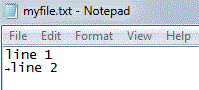
这看起来好像 Windows 操作系统确实“知道” Control-Z,但事实并非如此——只有部分应用代码会这样处理。如果用 Windows 的 Notepad 打开该文件,你会看到如上截图所示: (图片保留原始链接并本地化记录于 metadata)
Text versus binary mode
文本模式与二进制模式
So what is the difference between the type command used above and the Notepad application? It’s actually hard to say. Possibly the type command has some special code that checks for the Control-Z character in its input. However, Windows programmers using the C++ iostream library and the C stream library have the option of opening a file in either text mode or binary mode, and this will make a difference to what gets read.
那么上文中 type 命令与 Notepad 的区别是什么?其实很难说,可能 type 命令对输入做了特殊处理以检查 Control-Z。然而,使用 C++ iostream 或 C 标准流库的 Windows 程序员可以选择以文本模式或二进制模式打开文件,这会影响读取结果。
Here’s the canonical way to read a text file in C++:
#include <iostream>
#include <fstream>
#include <string>
using namespace std;

int main() {
    ifstream ifs( "myfile.txt" );
    string line;
    while( getline( ifs, line ) ) {
        cout << line << '\n';
    }
}
下面是读取文本文件的典型 C++ 写法(保持代码原样):
If you compile and run this file on Windows, you will see that the Control-Z is treated as an end-of-file marker; the output is:
line 1在 Windows 上编译并运行会把 Control-Z 当作 EOF,输出为: (示例输出保持原样)
However, if you open the file in binary mode by making this change:
ifstream ifs( "myfile.txt", ios::binary );但如果以二进制模式打开文件(如下修改): (代码保持原样)
the output is:
line 1
?line 2
输出为: (示例输出保持原样,显示 Control-Z 为普通字符)
The Control-Z character is only treated as being special in text mode (the default) – in binary mode, it is just treated as any other character. Note that this is only true for Windows; on Linux both programs behave in exactly the same manner.
Control-Z 仅在文本模式(默认)被视为特殊字符——在二进制模式下它只是普通字符。注意这仅适用于 Windows;在 Linux 上两种方式表现一致。
So what to do? There are two things to remember:
• If you want your files to open portably in text mode, don’t embed Control-Z characters in them. • If you must embed Control-Z characters, and you want the files to be read portably, open the files in binary mode.
那么应如何处理?记住两点:
• 如果希望文件在文本模式下可移植地打开,就不要在文件中嵌入 Control-Z。 • 如果必须嵌入 Control-Z 并希望可移植读取,就以二进制模式打开文件。
But what about Control-D?
那 Control-D 呢?
Some Linux users may at this point be thinking, “But what about the Control-D character I use to end shell input? Isn’t that an end-of-file character?” Well, no, it isn’t. If you embed a Control-D character in a text file, Linux will pay absolutely no attention to it. In fact, the Control-D you type in at the shell to end input is simply a signal to the shell to close the standard input stream. No character is inserted into the stream at all. In fact, using the stty utility, you can change what character causes standard input to be closed from Control-D to whatever you like, but in no case will a special character be inserted in the input stream, and even if it were, Linux would not treat it as an end-of-file marker.
有些 Linux 用户可能会想起:我在 shell 中用 Control-D 结束输入,那不是 EOF 字符吗?不是。把 Control-D 嵌入文本文件,Linux 完全不会理会。你在 shell 中键入的 Control-D 只是告诉 shell 关闭标准输入流的信号,并不会把某个字符插入流中。实际上可以用 stty 改变哪个字符用来关闭标准输入,但无论如何也不会把特殊字符插入输入流,即便插入,Linux 也不会把它当作 EOF 标记。
The EOF value in C++ and C
C 与 C++ 中的 EOF 值
Just to confuse things even more, both C++ and C define a special value with the name EOF. In C, it is defined in <stdio.h> as:
#define EOF (-1)进一步混淆的是,C 与 C++ 定义了一个名为 EOF 的特殊值。在 C 的 <stdio.h> 中定义为: (代码保持原样)
and similarly in
在 C++ 的
Notice that EOF in this context has nothing to do with Control-Z. It doesn’t have the value 26 and in fact in use it is not a character at all but an integer. It is used as the return value of functions like this:
int getchar(void);注意这里的 EOF 与 Control-Z 无关。它并不是值为 26 的字符,而是一个整数常量(如 -1),用于作为类似下面函数的返回值: (代码保持原样)
The getchar() function is used to read individual characters from standard input and returns the special value EOF when the end-of-file is reached. The end of file may or may be indicated by the Control-Z character (see discussion above), but in no case will the EOF value be the same as the ASCII code for Control-Z. In fact, getchar() returns an int, not a char, and it’s important that its return value is stored in an int, as a comparison between a char and a signed integer is not guaranteed to work correctly. The canonical way to use this function to read standard input is:
#include <stdio.h>

int main() {
    int c;
    while( (c = getchar()) != EOF ) {
        putchar( c );
    }
}
getchar() 用于从标准输入读取单个字符,当到达文件末尾时返回特殊值 EOF。文件结束可能由 Control-Z 指示(见上文),但 EOF 的值不会等于 Control-Z 的 ASCII 码。此外 getchar() 返回 int 而非 char,必须用 int 接收其返回值,因为直接将 char 与 signed int 比较可能不可靠。典型用法如下: (代码保持原样)
The eof() and feof() functions
eof() 与 feof() 函数
Another layer of confusion is added by both C++ and C providing functions to check the state of an input stream. Almost all beginner programmers get confused by these functions, so it may be a good idea to state up-front what they do and how they should not be used:
Both eof() and feof() check the state of an input stream to see if an end-of-file condition has occurred. Such a condition can only occur following an attempted read operation. If you call either function without previously performing a read, your code is wrong! Never loop on an eof function.
C 与 C++ 提供了检查输入流状态的函数,这反而增加了混淆。几乎所有初学者都会被这些函数误导,因此应先说明它们的作用与不当用法:
eof() 与 feof() 用于检查输入流是否处于文件结束状态。只有在尝试读取之后才可能出现 EOF 状态。如果在未读操作之前调用这些函数,你的代码就是错误的!不要以 eof() 为循环条件。
To illustrate this, let’s write a program that reads a file, and adds line numbers to the file contents on output. To simplify things, we’ll use a fixed file name and skip any error checking. Most beginners will write something like this:
#include <iostream>
#include <fstream>
#include <string>
using namespace std;

int main() {
    ifstream ifs( "afile.txt" );
    int n = 0;
    while( ! ifs.eof() ) {
        string line;
        getline( ifs, line );
        cout << ++n << " " << line << '\n';
    }
}
举例说明:写一个给每行输出行号的程序,许多初学者会这样写(省略错误检查): (代码保持原样)
This seems sensible enough, but remember the advice – “If you call either function without previously performing a read, your code is wrong!” and in this case we are indeed calling eof() before a read operation. To see why this is wrong, consider what happens if afile.txt is an empty file. The first time through the loop the check for eof() will fail, as no read operation has occurred. We then read something, which will set the end-of-file condition, but too late. And we then output a line, with line number 1, that does not exist in the input file. By similar logic, the program always outputs one spurious extra line.
这看起来似乎合理,但记住之前的建议——在读操作之前调用 eof() 是错误的!如果 afile.txt 是空文件,循环第一次检查 eof() 为假(因为尚未读取),随后 getline 读取失败并设置 EOF,但为时已晚,程序会输出一个不存在的行(行号 1)。同理,程序总会多输出一行垃圾。
To write the program properly, you need to call the eof() function after the read operation, or not at all. If you are not expecting to encounter problems other than end-of-file, you would write the code like this:
int main() {
    ifstream ifs( "afile.txt" );
    int n = 0;
    string line;
    while( getline( ifs, line ) ) {
        cout << ++n << " " << line << '\n';
    }
}
正确写法是不要以 eof() 为循环条件,而应把读取作为循环条件。例如: (代码保持原样)
This uses a conversion operator which turns the return value of getline(), which is the stream passed as the first parameter, into something that can be tested in a while-loop – the loop continues as long as the stream is not in an end-of-file (or other error) condition.
这是利用了 getline() 的返回值(即传入的流对象)在循环条件中的转换操作,只要流没有进入 EOF 或其他错误状态,循环就会继续。
Similarly in C. You should not write code like this:
#include <stdio.h>

int main() {
    FILE * f = fopen( "afile.txt", "r" );
    char line[100];
    int n = 0;
    while( ! feof( f ) ) {
        fgets( line, 100, f );
        printf( "%d %s", ++n, line );
    }
    fclose( f );
}
C 语言也类似,不应写成如下形式: (代码保持原样)
which will almost certainly print garbage if handed an empty file (and exhibit undefined behaviour too). You want:
#include <stdio.h>

int main() {
    FILE * f = fopen( "afile.txt", "r" );
    char line[100];
    int n = 0;
    while( fgets( line, 100, f ) != NULL ) {
        printf( "%d %s", ++n, line );
    }
    fclose( f );
}
如果传入空文件,前者很可能输出垃圾并出现未定义行为。正确写法为: (代码保持原样)
So if eof() and feof() are so apparently useless, why do the C++ and C Standard Libraries supply them? Well, they are useful in the case where a read error could be caused by something other than end-of-file, and you want to distinguish if that’s the case:
#include <iostream>
#include <fstream>
#include <string>
using namespace std;

int main() {
    ifstream ifs( "afile.txt" );
    int n = 0;
    string line;
    while( getline( ifs, line ) ) {
        cout << ++n << " " << line << '\n';
    }
    if ( ifs.eof() ) {
        // OK - EOF is an expected condition
    } else {
        // ERROR - we hit something other than EOF
    }
}
既然 eof()/feof() 看似没用,为什么标准库还要提供它们?当读取失败可能由除 EOF 以外的错误引起时,它们可以帮助区分原因。例如: (代码保持原样)
Summary
总结
All the above may make it seem that the EOF issue is extremely complicated, but it really only comes down to three basic rules:
- There is no EOF character, unless you open files in text mode on Windows, or implement one yourself.
- The EOF symbol in C++ and C is not an end-of-file character, it is special return value of certain library functions.
- Don’t loop on the eof() or feof() functions.
If you keep these rules in mind, you should avoid being bitten by most of the bugs associated with misunderstanding the nature of the end-of-file condition in C++ and C.
以上内容看似复杂,但归结为三条基本规则:
- 并不存在通用的 EOF 字符(除非在 Windows 文本模式下或你自己实现了某个标记)。
- C 与 C++ 中的 EOF 是一个特殊返回值,而不是文件结束字符。
- 不要以 eof() 或 feof() 作为循环条件。
牢记这三点,就能避免大多数由误解 EOF 本质引发的 C/C++ 错误。